
An all-in-one media manager and profanity filter for Plex.
CleanCut Suite finds and adds new movies and shows (like Radarr, Sonarr and a download client in one app), then cleans the language automatically before your kids press play: it mutes just the word, stars it out in the subtitles, and listens to the audio when subtitles are missing. Clean titles are labeled Kid Safe in Plex, and kid profiles keep to your age limit. Optional built-in VPN with a kill switch. Already have your movies? CleanCut Cleaner does just the cleaning. It runs on your own home server. Pay once, from $2.99, and it's yours forever. No subscription.
Free trial: 3 movies and 10 TV episodes cleaned with every feature. No card needed.
Never set up a home server? CleanCut is made for beginners.
See it on a real server
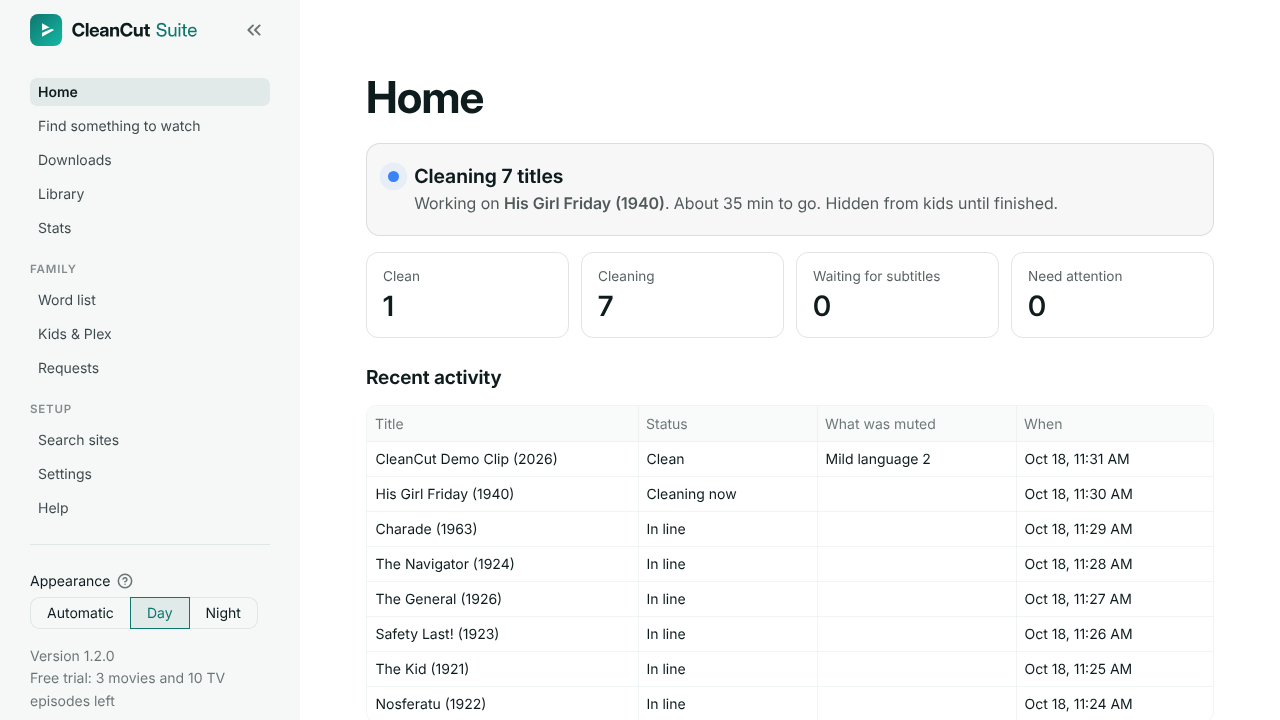
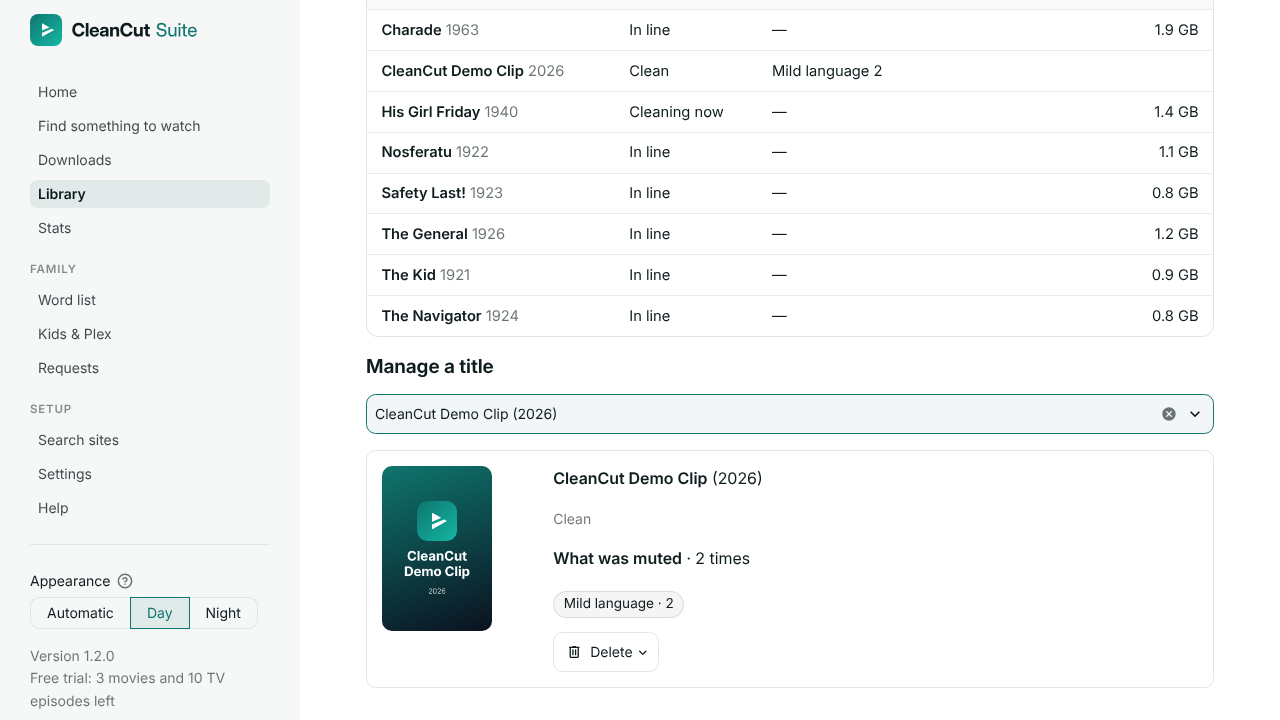
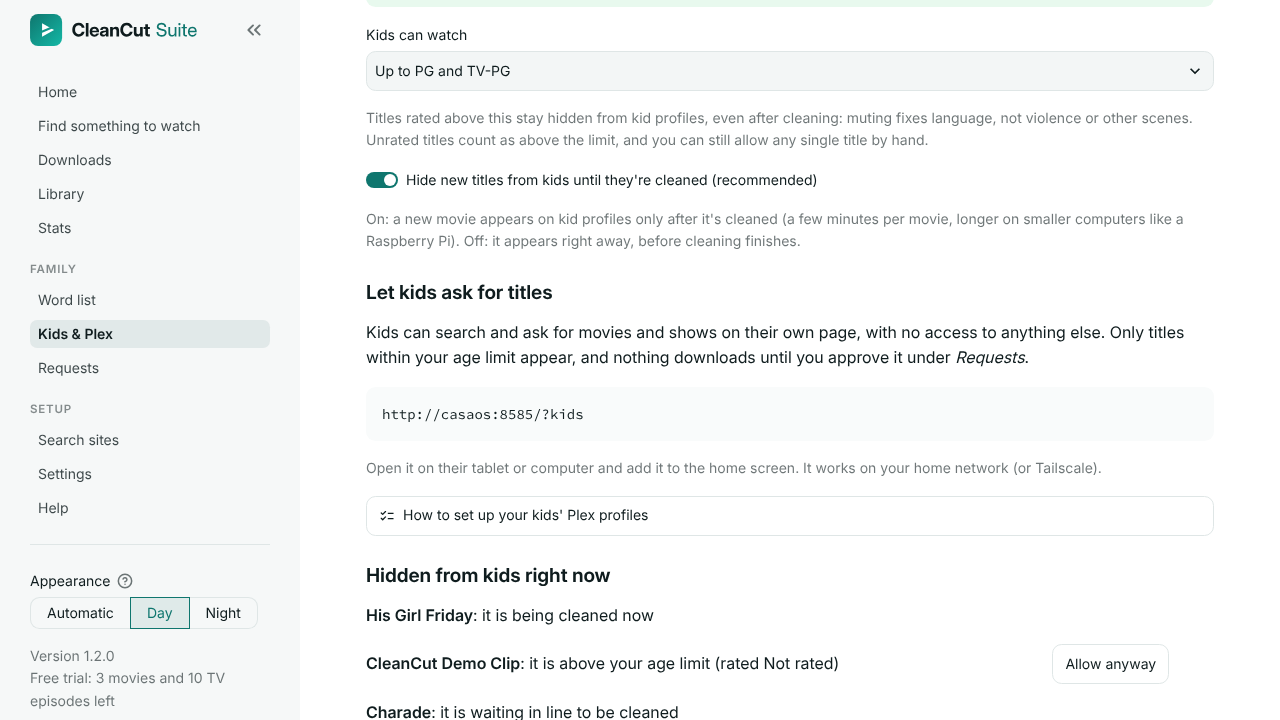
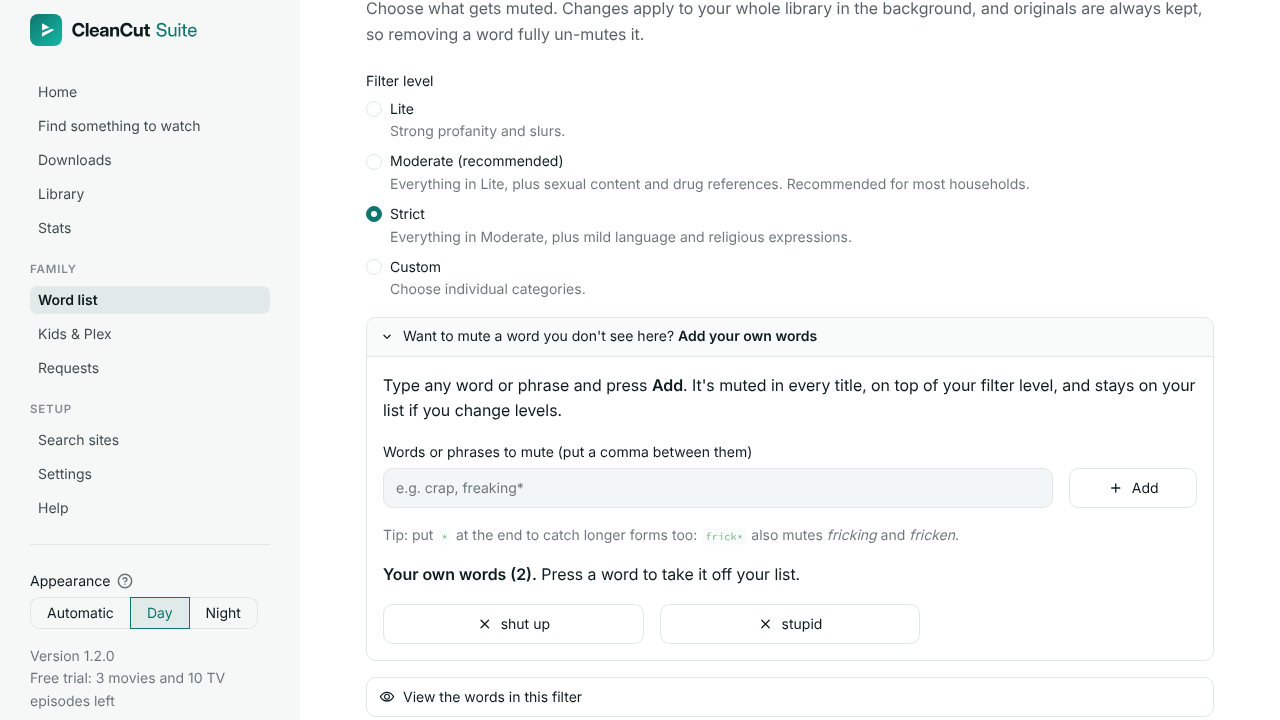
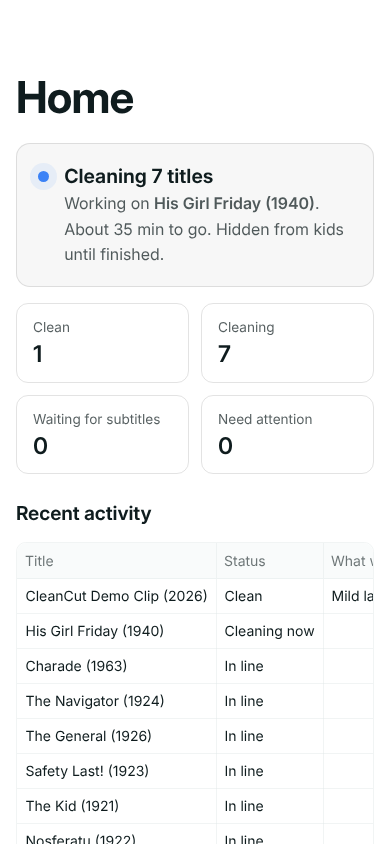
Real screens from CleanCut, cleaning public-domain films.
Everything your family's Plex needs, in one app
CleanCut Suite manages your movies and shows and cleans the copies on your own server, once, so every TV, phone and tablet with Plex plays the clean version. Nothing to install on the TV, and nothing to remember on movie night. The media manager works only with sources you add yourself; no sources are included or enabled by default.
Finds and adds new titles
CleanCut Suite finds the new movies and shows you ask for and adds them to Plex, then cleans them. It works only with sources you add yourself.
One app, not five
Like Radarr, Sonarr and a download client in one app, already connected to each other and to Plex. No setup screens to wire together.
Built-in VPN with kill switch
Optional, in CleanCut Suite. If the VPN drops, downloading stops, so your home internet address stays private.
Kids can ask for a title
A simple page where your kids ask for a movie or show, and you say yes or no. Yes means CleanCut Suite finds it, cleans it and adds it.
Mutes the word, not the scene
Each swear word is found inside the line and silenced (or bleeped), so you lose a fraction of a second, not the whole sentence. Smart mute picks the right amount for each word.
Listens when subtitles miss
No subtitles, or a word they left out? CleanCut can listen to the audio itself, right on your server. Nothing is uploaded.
Clean subtitles too
Bad words show as f*** in the subtitles. The originals are kept as backup tracks, so nothing is ever lost.
Kid Safe in Plex
Clean titles get a Kid Safe label in Plex. Kid profiles can be set to show only those, so they never see a title before it's clean.
Age limits for kids
Choose PG, PG-13 and so on. Anything rated higher, or not rated, stays off kid profiles, even after cleaning.
Your words, your call
Pick Lite, Moderate or Strict, or choose the categories yourself. Add your own words, and every title shows what was muted, like “Strong language 4”.
Undo any time
The original audio stays inside each file as a backup track. Loosen your word list later and titles are cleaned again to match.
Runs on a Raspberry Pi 5
Or any mini-PC, NAS or home server. Cleaning a movie takes a few minutes (longer on smaller computers), and the picture is never touched.
How it works
Install one app
From the CleanCut store in your server's app store, or by pasting one file. Everything it needs is built in.
Pick your folders and Plex
Point CleanCut at the movies and shows already on your Plex, sign in to Plex, and pick how strict the filter is and your kids' age limit.
Add a movie
CleanCut cleans it in a few minutes and it appears on your kids' Plex profiles.
About ten minutes from the app store, on a server that already runs CasaOS or ZimaOS and Plex. Starting from scratch? The install guide walks you through every click.
Made for beginners
Never used Linux (the free system most home servers run) or CasaOS (a free, app-store-style home screen for your server)? You don't need to know them. CleanCut is built for parents, not computer experts: one app, a guided setup that explains every step, and plain-English help whenever you need it.
One app from your app store
On CasaOS or ZimaOS, add the CleanCut store once and press Install. On Unraid, Synology or TrueNAS you paste one file. The install guide shows every click.
A setup guide that explains each step
It starts with one question: clean the movies and shows already on your Plex, or also find new ones. Then Plex and kids, and what to mute. Each step says what it's for in plain words.
A one-click check-up
The Run check-up button tests Plex, your drive, the cleaning engine and your license in one go, and links each problem straight to its fix.
It tells you when something needs you
The Home page says “Everything is family-safe”, or lists what needs your attention in plain words, with a link to the fix.
Help written for beginners
Every common problem starts with what it means, then gives the steps in order, saying exactly where to click. The same help is on this website.
See it work with one button
If CleanCut also downloads for you, Try it now fetches Charade (1963), a free public-domain classic from the Internet Archive, so you can watch it get cleaned and appear in Plex. Cleaning only? Your own titles start cleaning right away, and Home shows each one as it's done.
Settings save the moment you change them. A backup of everything is one file, made by itself every week. Updates are free, and on CasaOS or ZimaOS they come through the CleanCut store.
Two ways to own it. Buy once, yours forever.
Pick the one that fits your family. Try everything free first: the trial cleans 3 movies and 10 TV episodes and includes finding and downloading too. Your key is emailed straight away.
Launch prices: $2.99 or $5.99, once. The price for new buyers will go up as we add more features and big improvements. Buy now and your license is yours forever, with free updates.
CleanCut Cleaner
Just the language cleaning, for the movies and shows you already have.
- Mutes the swearing in the movies and shows on your Plex
- Clean subtitles, Kid Safe labels and age limits for kid profiles
- Your own word lists, stats and automatic backups
- No VPN needed: the simplest install, on a home server or a Mac
CleanCut Suite
The all-in-one media manager and profanity filter for Plex.
- Everything in CleanCut Cleaner
- Finds and adds new movies and shows, then cleans them: like Radarr, Sonarr and a download client in one app
- A page where your kids can ask for a title, and you say yes or no
- Optional built-in VPN with a kill switch
- Works only with sources you add yourself; none are included or enabled by default
Both: one household, a license that never expires, free updates, move to a new server any time, no account and no tracking (we never see what you watch). Start with Cleaner and upgrade to Suite any time for just the difference, $3.
No CleanCut subscription. Plex Pass, and a VPN if you use one, are separate services from other companies.
On sale very soon. Install it now and use the free trial in the meantime.
What you'll need
- An always-on computer at home, such as a mini-PC, Raspberry Pi 5 or NAS
- A big drive for your movies and shows
- Plex (free)
- Locking kid profiles to clean titles needs Plex Pass, Plex's paid plan
- Watching away from home needs Plex Pass or Plex's Remote Watch Pass
- Optional: a VPN, for privacy when CleanCut downloads
Already have these? CleanCut is the only thing you buy.
How CleanCut compares
Streaming filters work inside streaming apps and charge every month. CleanCut filters the profanity in the movies and shows on your own Plex, for one price.
| Price | Works with | What it does | |
|---|---|---|---|
| CleanCut | From $2.99 once | Movies and shows on your own Plex, on every TV, phone and tablet with the Plex app | Mutes the word, stars it out in subtitles, and keeps titles above your age limit off kid profiles. Suite also finds and adds new movies and shows |
| VidAngel | $11.99 a month, or $119.99 a year | Netflix, Prime Video and other streaming services, in VidAngel's apps | Skips scenes and mutes language |
| ClearPlay | $7.99 a month | Netflix, Prime Video and other streaming services | Skips scenes and mutes language |
| Enjoy Movies Your Way | $7.99 a month (Premium) | Netflix, Prime Video and other streaming services, on phones, Roku, Fire TV and Chrome | Skips scenes and mutes language |
| TVGuardian | $199.99 (501HD box) | Cable and satellite TV, not streaming apps | Mutes the whole sentence |
Prices checked October 2026 on each company's own website. Their prices can change. Streaming filters can also skip scenes; CleanCut mutes language and uses your age limit for the rest. Free do-it-yourself tools can add a muted audio track too; CleanCut also does the subtitles, Kid Safe labels, age limits, kid requests and the setup, all in one app.
Control it from your phone, anywhere
CleanCut works in your phone's web browser at home, with nothing to set up. Add the free Tailscale app and it works anywhere: a private, encrypted link between your own phone and your server, with no changes to your router.
Put Tailscale on your server
It's free for personal use. CasaOS, ZimaOS, Unraid, Synology and TrueNAS have it in their app stores, and the phone guide shows you how. Then sign in.
Put Tailscale on your phone
Install it from the App Store or Google Play and sign in with the same account. Your phone can now reach your server from anywhere.
Open CleanCut
In your phone's web browser, go to http://<your server's Tailscale name>:8585 and sign in with your parent password.
Nothing on your home network is opened to the internet. This is for managing CleanCut. Watching your movies away from home happens in the Plex app, which needs Plex Pass or Plex's Remote Watch Pass for that.
Behind the scenes: finding new titles (CleanCut Suite)
Cleaning the library you already have is all many families need. If you'd also like CleanCut to find new movies and shows, CleanCut Suite has well-known free tools built in and sets them up for you. They stay out of sight, and nothing is switched on until you choose it.
Radarr
Finds the movies you add, on the search sites you chose, at the size you picked.
Sonarr
Does the same for TV shows, and can fetch new episodes as they air.
Prowlarr
Keeps the list of sources you added yourself. No sources are included or enabled by default.
Bazarr
Fetches English subtitles and lines them up with the audio, so CleanCut knows when each word is said. It works for the movies you already have, too.
Built-in downloader
Stops sharing with other people as soon as each download finishes, unless you switch on “Keep sharing after a download finishes”.
Optional VPN
Recommended if CleanCut downloads: it keeps your family's home internet address private. If it drops, downloading stops.
No sources are included or enabled by default. Add only sources you have permission to use, in Settings under Search sites; you're responsible for what you download. Like to look under the hood? Expert mode (Settings → System → Advanced) can open the built-in apps. You'll never need to.
Who makes this
I'm Ethen, a dad in Mississippi. I built CleanCut for our own family's movie nights.
Questions? Email ethen@harrelsons.org – you'll reach me, not a call center.
Questions
How does the profanity filter find the swear words?
It reads the subtitles to learn when each word is said, and lines them up with the audio. No subtitles, or a word they left out? It can listen to the audio itself, right on your server; nothing is uploaded. Smart mute silences just the word when it's sure of the timing, and a little more when it isn't. No filter is perfect, so there's a Report a word we missed button, and you can add your own words.
Is it legal to mute my movies?
CleanCut only changes the copies on your own server, for your own household, and never uploads the cleaned versions anywhere. It keeps the original audio inside each file, so you can switch back any time. No download sources are included or enabled by default. Like Plex itself, you're responsible for what you download and add: make sure you have the right to every movie and show.
Does it skip scenes, or other languages?
CleanCut mutes words in English-language movies and shows. It doesn't cut scenes. Instead, your age limit keeps anything rated above it off your kids' profiles, even after cleaning.
Can it clean the movies I already have?
Yes, that's the first choice in setup. Pick the movie and TV folders your Plex already uses, in setup or later in Settings. CleanCut rewrites those files in place to add the clean audio track, and the original audio stays inside each file as a backup track. As with anything that changes your files, back up anything irreplaceable first.
Do I need to be good with computers?
No. If you can install an app from your server's app store (CasaOS, ZimaOS, Unraid, Synology or TrueNAS), you can set up CleanCut. A step-by-step guide walks you through the rest, and a one-click check-up tells you if anything needs fixing. On a server that already runs CasaOS or ZimaOS and Plex, it takes about ten minutes.
I've never used Linux or CasaOS. Can I really do this?
Yes. Using CleanCut never needs a terminal (a window where you type commands): everything happens in your web browser, with buttons and plain-English steps. The install guide starts from nothing and explains every technical word. CasaOS and ZimaOS are free home screens for your server that work like an app store. Some home servers, such as ZimaBoard, come with one already. If yours doesn't, the install guide shows the easiest way to add one. A Mac with Apple silicon can run CleanCut in the free Docker Desktop app too, and so can a Windows PC (Windows is in early access while we test it on more computers).
What is Plex?
Plex is a free app that turns the movies on your server into your own streaming service on every TV, phone and tablet. It's separate from CleanCut: CleanCut cleans the titles, and your family watches them in Plex. If you don't have Plex yet, the install guide shows how to add it.
What do I need?
A computer that stays on at home (a Raspberry Pi 5, mini-PC, NAS or home server), a big drive for your movies, and Plex. On CasaOS or ZimaOS you add the CleanCut store once and install from there; on Unraid, Synology, TrueNAS or QNAP you paste one file. Watching in Plex is free. Limiting kid profiles to clean titles uses Plex's label restrictions, which need Plex Pass (Plex's paid plan) on the account that owns your Plex server. Watching away from home needs Plex Pass or Plex's Remote Watch Pass.
Do I need a VPN?
Not to clean the movies and shows already on your Plex. If you also let CleanCut find and download new titles, a VPN is recommended: it keeps your family's home internet address private. It's a paid service from another company; CleanCut works with any that supports WireGuard or OpenVPN.
Can CleanCut find new movies and shows too?
Yes, with CleanCut Suite, if you want it to. It's an all-in-one media manager, like Radarr, Sonarr and a download client in one app, and it works with sources you add yourself. No sources are included or enabled by default: in Settings, under Search sites, you add the ones you have permission to use, one at a time, and you're responsible for what you download. Many families skip this and only clean what they already have, and CleanCut Cleaner is made for them.
What's the difference between CleanCut Cleaner and CleanCut Suite?
Both mute the swearing in the movies and shows on your Plex, clean the subtitles, label clean titles Kid Safe, and keep titles above your age limit off kid profiles, with your own word lists, stats and backups. CleanCut Cleaner ($2.99 once) does exactly that for the movies and shows you already have, and needs no VPN. CleanCut Suite ($5.99 once) is the all-in-one: it adds a media manager that finds and adds new movies and shows from sources you add yourself, a request page for your kids, and an optional built-in VPN with a kill switch.
Can I upgrade from Cleaner to Suite later?
Yes, any time, for just the difference ($3). Paste your Cleaner key on the upgrade page and your Suite key is emailed to you. Everything you've set up stays as it is.
Can I manage it from my phone?
Yes. CleanCut's dashboard works in your phone's web browser at home. Away from home, the free Tailscale app connects your phone to your server privately. Phone apps such as Helmarr (iPhone and iPad) and nzb360 (Android) can connect too. The phone guide covers every step.
What is Tailscale, and is it safe?
Tailscale is an app, free for personal use, that makes a private, encrypted link between your own devices, so your phone can reach your server from anywhere as if you were at home. There are no router changes and nothing on your home network is opened to the internet. Only devices signed in to your own Tailscale account can connect, and CleanCut still asks for your parent password.
Can I try it first?
Yes. Install it free: 3 movies and 10 TV episodes are cleaned with every feature, finding and downloading included, with no time limit and no card. Then buy the edition that fits.
Is the picture or sound quality reduced?
No. Only the moments with a bad word are silenced, and the original audio is kept inside the file as a backup track. Cleaning never touches the picture. Very large downloads can be shrunk in the background to save space, and the new copy is kept only if it looks the same. You can switch that off, and it starts off for folders you already had.
Will the price go up?
For new buyers, yes. $2.99 and $5.99 are launch prices, and the price will go up as we add more features and big improvements. If you've already bought, nothing changes: your license never expires and updates stay free.
What does the license cover?
One household, forever, with free updates. Move it to a new server any time with the same key. Bought CleanCut before there were two editions? Your key is a Suite key.
Is it a subscription?
No. CleanCut Cleaner is $2.99 once and CleanCut Suite is $5.99 once. There's no CleanCut subscription and no account, and we never see what you watch: your license is checked on your own server, and nothing is sent to us. Plex Pass, and anything else you choose to add, are separate services from other companies.
What if it doesn't work for me?
You're covered by our 30-day money-back guarantee. If CleanCut won't run on your server, or doesn't do what this page says, email ethen@harrelsons.org within 30 days and we'll refund you in full. The refunds page has the details.
Something else? Write to ethen@harrelsons.org.
Ready for movie night?
Clean 3 movies and 10 TV episodes free, with every feature. Buy when you're happy.
Questions? Email ethen@harrelsons.org.